Referral contacts
For staff
This page is for front-desk staff and people who manage clinic settings.
What it does
The Referral contacts tab holds the specialists and services this practice refers to, with a map search to find more.
When to use it
Use it to build and keep the referral list the doctors write to.
Step by step
-
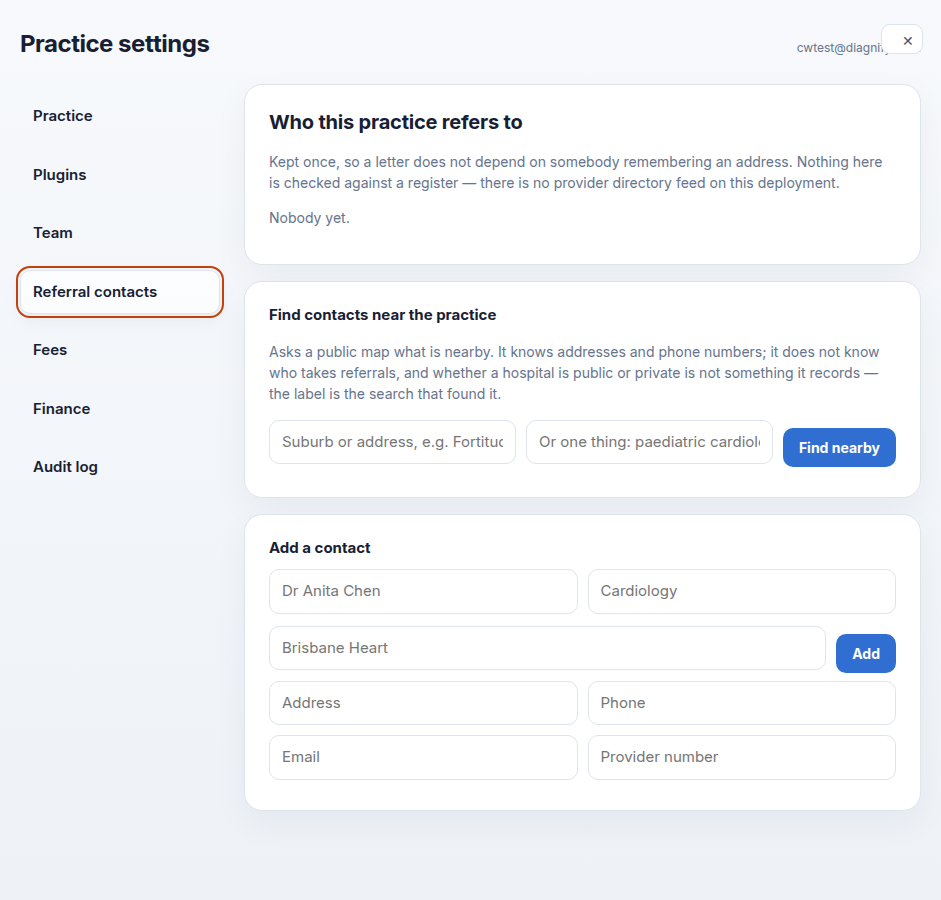
Press Referral contacts. The contact list, the nearby search and the add-by-hand form are here.
-
Press Add a contact by hand and fill in name, specialty, organisation, address, phone, email and provider number. Save when it is right.
Also on this screen:
- The contact list shows names already saved, with specialty and phone.
- Find nearby asks a public map what is near a suburb. It does not know who takes referrals.
- The search can be narrowed to one specialty, such as a paediatric cardiologist.
- Ticked map results can be added. They are marked not confirmed, and the list carries a map-search warning until someone checks them.
- Clear map results empties the search list without adding anyone.
What Agent D can do
- Agent D has no tools on this screen. Adding and checking contacts is done here by you.
Safety (what needs your Confirm)
- Map results are not confirmed. Ring the service before you send a patient.
- Adding a contact writes to the practice list. Check the provider number before you save.
Common questions
Why does a contact say "not confirmed"? It came from the map search. Someone still needs to check that the service takes referrals.
The map search found nothing useful. It only knows places, not who takes referrals. Add the service by hand instead.
Can I fix a wrong phone number? Yes. Edit the contact on the list and save.
Related
Last checked: 03/10/2026.