Medicare, IHI and DVA
The Identifiers screen manages and validates Medicare card numbers, Individual Healthcare Identifiers, and Department of Veterans' Affairs entitlements.
What it does
This screen manages official Australian healthcare identifiers: - Medicare card: Validates the 10-digit card number, Individual Reference Number (IRN), and expiry date. Real-time Online Patient Verification (OPV) verifies card validity against Services Australia. - Individual Healthcare Identifier (IHI): Displays the 16-digit national identifier, check digits, and electronic verification status via the national Healthcare Identifiers Service. - Department of Veterans' Affairs (DVA): Records DVA card numbers and displays verification badges (DVA Gold, DVA White, or Unchecked). - Private and Concession cards: Records private health insurance details, Commonwealth Seniors Health Cards, Pensioner Concession Cards, and Health Care Cards.
When to use it
Use this screen when verifying patient eligibility prior to consultation, checking bulk-billing entitlements, updating renewed Medicare cards, or resolving electronic prescribing identifier errors.
Step by step
- On the patient banner, check the M (Medicare) and IHI status badges.

- Select the date of birth or the identifier badge to open the Medicare, IHI and DVA management card.
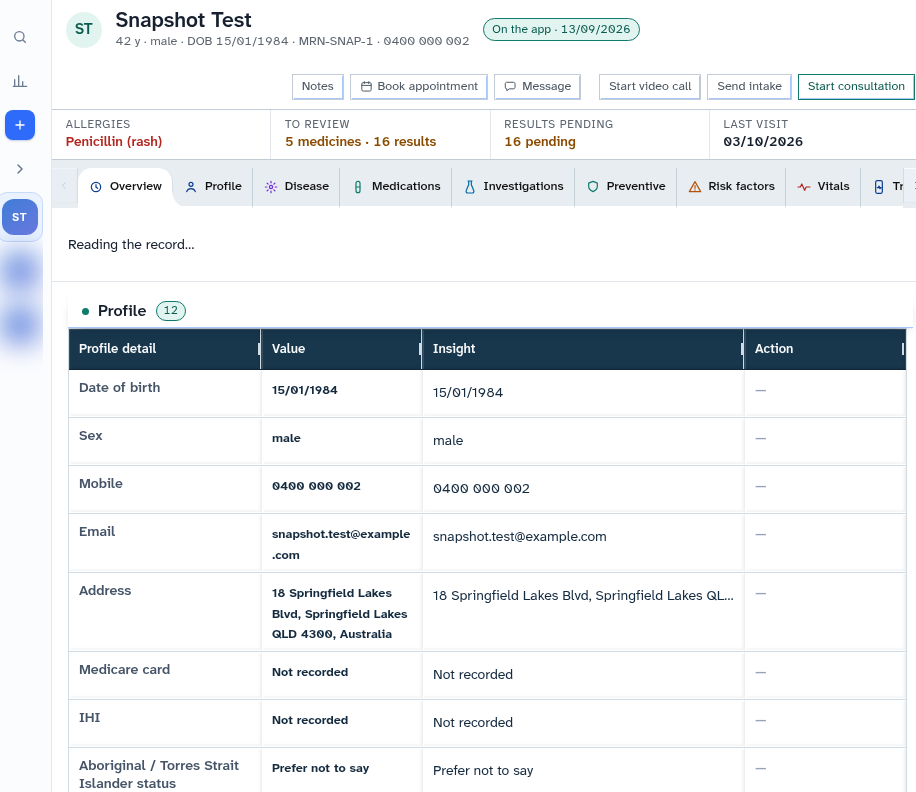
Also on this screen
- Medicare M badge: Indicator showing whether a verified Medicare card is on file; clicking opens the cover editor.
- IHI badge: Displays whether an active IHI is resolved for electronic prescribing and My Health Record connectivity.
- Medicare OPV badge: Real-time verification badge confirming that the patient Medicare details match national records.
- IHI card and Re-check: Card showing the 16-digit IHI and verification state, with a Re-check button to query the HI service.
- Medicare, private, concession, DVA: Multi-card form allowing staff to tick active entitlement cards and enter card numbers and expiry dates.
- DVA check badge: Distinct header badge showing DVA verification status (DVA Gold, DVA White, or Unchecked) with troubleshooting guidance.
What Agent D can do
- Agent D checks IHI and provider identifier check digits using
patients.hi_check. - Agent D drafts automated IHI lookups against the national HI service (
patients.ihi_lookup). - Agent D checks online patient verification status with
patients.medicare_opv_statusand drafts verification calls (patients.medicare_opv_verify). - Agent D checks DVA entitlements using
patients.dva_check_statusandpatients.dva_check. - Agent D cannot alter card numbers without explicit staff confirmation.
Safety (what needs your Confirm)
- Verifying entitlements confirms billing eligibility for Medicare and DVA claims.
- Updating card numbers or IRNs creates a draft update that requires explicit clinician or staff confirmation before saving.
Common questions
What does the green "OPV ✓" badge mean?
It confirms that Services Australia verified the patient Medicare card number, IRN, and name in real time.
Why is an IHI required?
An active IHI is legally required in Australia for electronic prescribing (eScripts) and uploading shared health summaries to My Health Record.
What should I do if the IHI check fails?
Verify that the patient full legal name, date of birth (DD/MM/YYYY), and sex at birth match their Medicare card exactly, then click Re-check.
Related
Last reviewed: 03/10/2026.