Investigations on the chart
The Investigations screen displays the patient diagnostic history, cumulative laboratory results, imaging reports, and outstanding investigation orders.
What it does
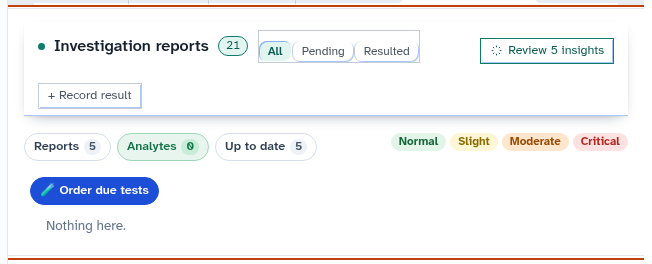
This screen provides three synchronized views of patient investigations: 1. Reports: Chronological list of incoming pathology and medical imaging reports. 2. Analytes: Cumulative numerical tables and range charts tracking individual biomarkers over time (such as creatinine, eGFR, lipids, or liver enzymes). 3. Up to date: Clinical tracking status showing whether routine monitoring investigations are current or overdue according to clinical guidelines.
Clinicians can order overdue investigations directly, track outstanding tests, and review clinical actions taken on each report.
When to use it
Use this screen when tracking disease progression over time, reviewing cumulative blood test trends, following up on pending imaging studies, or ordering routine chronic disease pathology.
Step by step
- Select Investigations in the chart sections menu to view diagnostic reports and cumulative analytes.
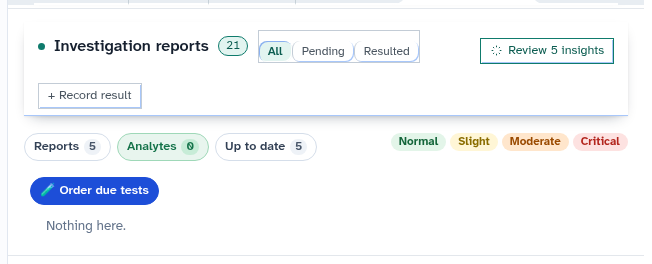
- Select Order due tests to launch the investigation ordering drawer pre-filled with overdue monitoring items.
Also on this screen
- Reports, analytes, up to date: Three distinct view tabs organizing diagnostic reports, numerical trends, and monitoring timeliness.
- Order due tests: Action button that prepares draft pathology orders for overdue routine monitoring items.
- Result actions: Full action menu for each report (File as reviewed, Tell the patient, Discuss next visit, Repeat test, Book review, Call today).
- Tests and orders tracker: Comprehensive tracker monitoring the status of diagnostic orders from initial request to final report delivery.
- Row actions on a result: Quick triage actions matching the main Results inbox workflow.
What Agent D can do
- Agent D reads patient diagnostic orders via
patients.list_ordersand received results usingpatients.list_results. - Agent D tracks order lifecycle transitions (
patients.move_order) and result status changes (patients.move_result). - Agent D drafts new pathology and imaging request forms when Order due tests is selected.
- Agent D records incoming results to the chart via
patients.record_result.
Safety (what needs your Confirm)
- Selecting "Order due tests" drafts investigation orders; no request forms are printed or sent electronically until you review and confirm.
- Filing results or assigning recall actions permanently updates the patient clinical record.
Common questions
How do I see a graph of a specific blood test over time?
Select the "Analytes" tab, locate the specific test (such as HbA1c), and click the graph icon to view the longitudinal trend chart.
Can I view radiology and imaging reports here?
Yes. Both pathology laboratory tests and diagnostic imaging reports appear in the Investigations list.
What happens when an ordered test is resulted?
The electronic result is matched to the original order, the order tracker updates to "Resulted", and the report is filed into the patient record.
Related
Last reviewed: 03/10/2026.