Do it and today's jobs
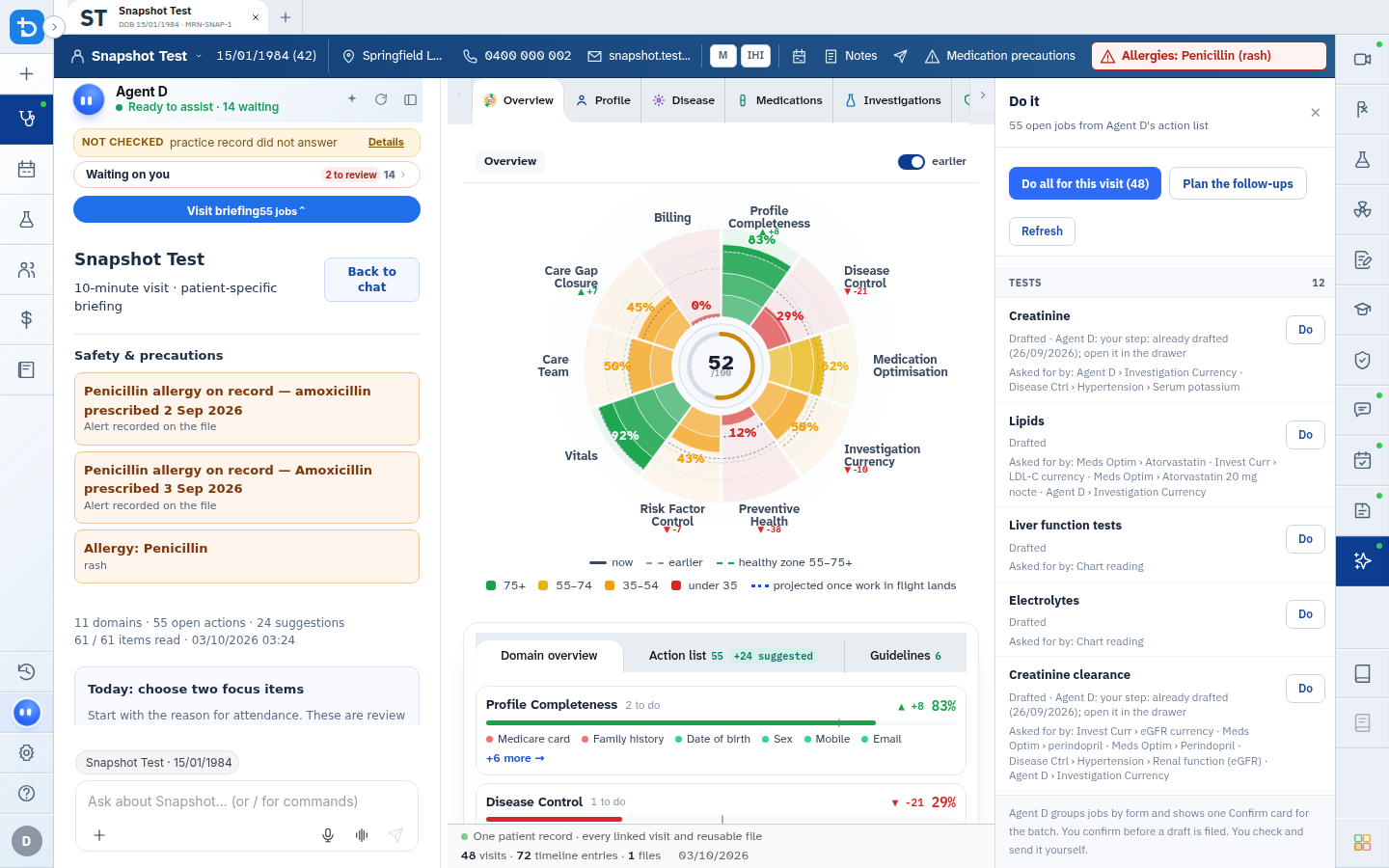
The "Do it" action ledger consolidates outstanding clinical tasks across the patient chart, allowing clinicians to review and batch-draft required orders.
What it does
The "Do it" tool identifies overdue health maintenance tasks, pending laboratory follow-ups, and outstanding care plan items from the patient chart. Clinicians can review the assembled task list, execute individual tasks, plan follow-ups, or batch-draft all required orders onto a single Confirm card.
When to use it
Use the "Do it" drawer during routine consultations, annual health assessments, or complex chronic disease reviews to address accumulated care gaps efficiently.
Step by step
- Select Do it on the right toolbar to inspect the assembled action ledger for the active patient.
Also on this screen
- Do all for this visit: Directs Agent D to draft all indicated jobs (e.g., blood tests, repeat scripts, and letters) in one comprehensive batch.
- Plan the follow-ups: Transfers future monitoring tasks into the recall scheduler.
- Do one job: Triggers drafting for an individual clinical task without affecting other pending items.
- Refresh list: Re-evaluates the patient chart to refresh pending tasks following note updates.
- Connection health check: Displays diagnostic retry controls if the background reasoning service encounters connectivity issues.
What Agent D can do
- Agent D scans the chart for overdue diabetic cycles of care, cardiovascular assessments, and screening tests.
- Agent D drafts multiple clinical orders simultaneously onto one unified Confirm card.
- Agent D cannot file, sign, or transmit batch orders without explicit clinician confirmation.
Safety (what needs your Confirm)
- Batch generation prepares drafts only. You must review each item before confirming.
- You can uncheck any individual task in the ledger before selecting Do all.
Common questions
What happens when I click Do all for this visit?
Agent D opens the respective tool drawers and prepares drafts for each checked task. All items appear on a single Confirm card for your approval.
Can I dismiss a job that is not clinically appropriate today?
Yes. You can uncheck the job or dismiss it from the ledger with an explanatory note.
Does "Do it" replace clinical judgment?
No. The ledger serves as an opportunistic reminder tool. You decide which interventions are appropriate during the current visit.
Related
Last reviewed: 03/10/2026.