Invoice on the chart
What it does
The invoice editor on the consult chart raises an invoice for this visit, priced from the Medicare schedule.
When to use it
Use it at the end of a consult, before the patient leaves, or from the Billing part of the chart.
Step by step
-
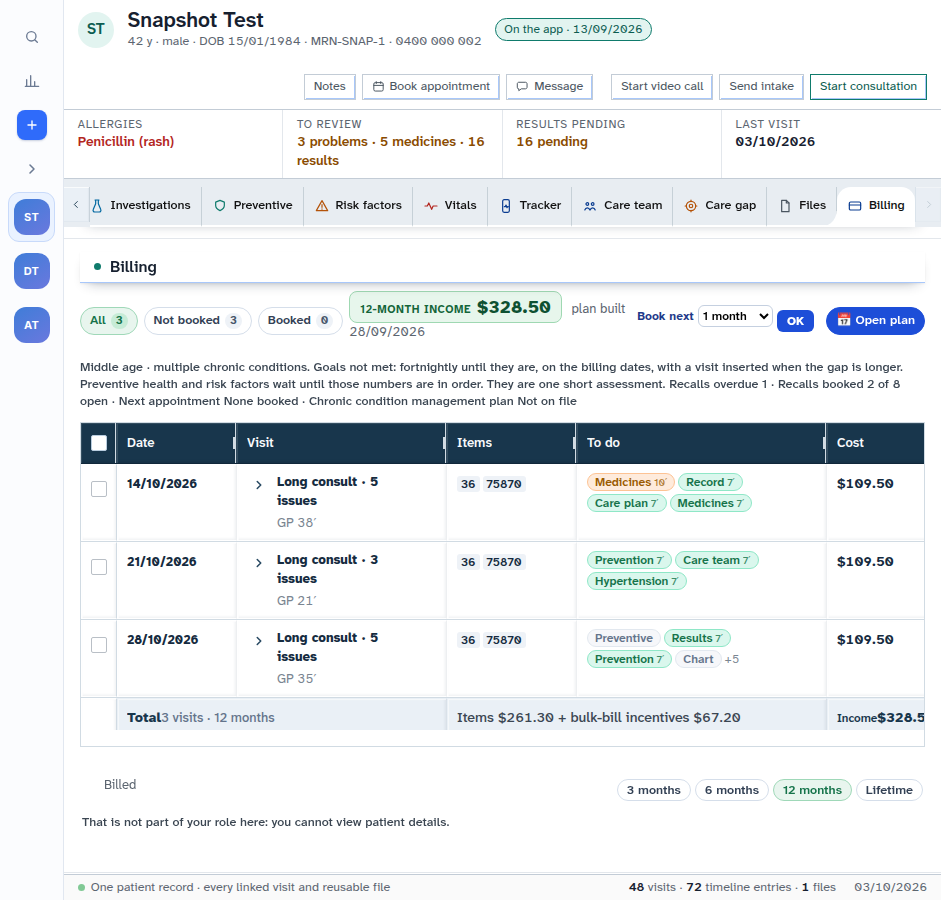
Open the patient — we use Snapshot Test — and press Billing. The 12-month billing plan shows on the chart.
-
Start a draft invoice and add item lines. Check the time, the items and the fee.
-
Press Raise the invoice only after you have checked it. In the shot above, the login cannot view patient billing details, so the button is not on screen.
Also on this screen:
- The owing total shows how much is still owed on issued invoices.
- A suggested item is offered from the visit clock — item 3, 23, 36, 44 or 123 by how long the consult ran. It asks you to check it.
- Bulk bill or private chooses whether Medicare is the payer or the patient is.
- The benefit tier picks the published column: 100, 85 or 75 percent. A tier the item does not publish is refused.
- The private fee box lets you type the practice fee. Blank uses the fee list, then the schedule fee.
- The schedule search looks up an item by number or words, and shows the published fee and benefit.
- Draft lines can be removed one by one, or Clear the draft empties them all.
- Hovering the visit doctor shows the doctor's name and provider number.
- The treating doctor is stored on every new bill.
What Agent D can do
- On the test site,
/bill(short name/mbs) drafts the item lines from the consult note for you to check. See Ask Agent D to draft a bill. New (test site) - Read the price of a line and freeze it.
- Raise the draft invoice — only after your Confirm.
Safety (what needs your Confirm)
- Raise the invoice is yours. Until it is raised, everything is a draft that can be cleared.
- Check the suggested item against what happened in the consult. The clock is only a hint.
- Agent D drafts and prices. The raise step waits for your Confirm.
Common questions
Why did it suggest item 23? The visit clock ran in a band that usually fits item 23. Check it and change it if the visit was different.
What does the tier do? It picks the published benefit column — 100, 85 or 75 percent — for that item.
I left the private fee blank. What fee is used? Your fee list first, then the schedule fee.
Related
Last checked: 03/10/2026.