Recalls and follow-ups
What it does
The Recall and booking drawer plans the follow-ups a visit needs, then books them or sends a recall to the patient.
When to use it
Use it near the end of a consult, when you know the patient needs to come back, or needs a check in a few weeks.
Step by step
-
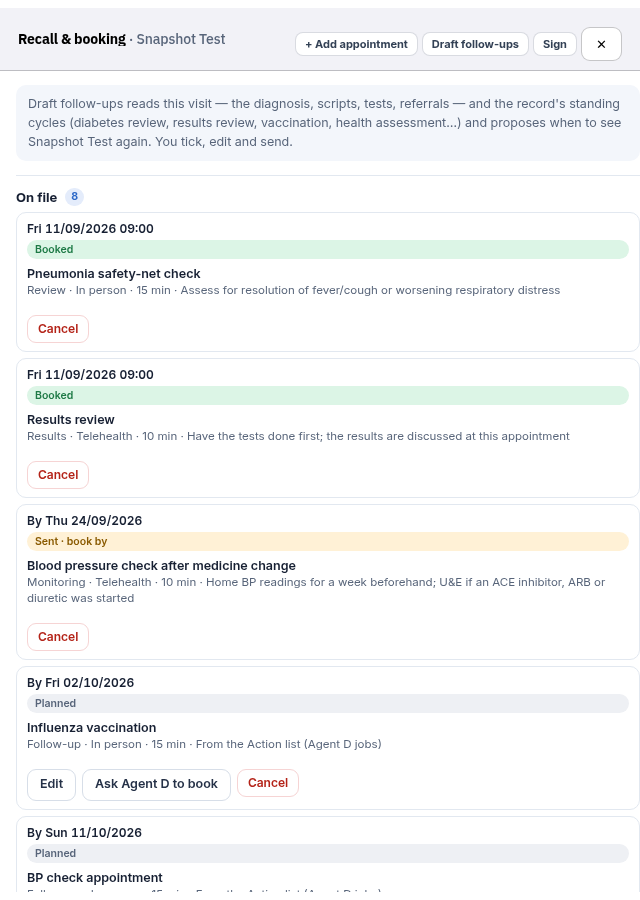
Open the patient's chart — we use Snapshot Test — then press Recall and booking.
-
Draft the follow-up list, then adjust it. Book and send, Recall only and send, Cancel and Sign stay yours to press.
-
When you are ready, choose Book and send to book the first free slot on or after each due date and send the invite, or Recall only and send to ask the patient to book by the due date.
Also on this screen:
- Add appointment types one future visit: reason, type, length, a date or "in N weeks", the clinician, and a note.
- Draft follow-ups reads this visit and the usual cycles, and drafts a follow-up list you can edit.
- Combine puts ticked follow-ups into one visit. Separate splits them again.
- Each planned visit can be edited or cancelled on its row. Sign signs the recall action.
- The video visit panel rings the patient in the app, shows video, and writes a note from the transcript.
- Reminders run once an hour: appointment reminder texts for bookings that have not had one, and recall reminders by email or the app.
What Agent D can do
- Draft the follow-up list from this visit and the usual cycles.
- Book a planned visit — but only after your Confirm.
- Read the practice-wide recalls that are due, with patient names.
- On the test site,
/recalldrafts the follow-ups on one Confirm card. New (test site)
Safety (what needs your Confirm)
- Book and send and Recall only and send message the patient. They are always yours to press.
- Sign is yours.
- Agent D only books a recall visit after your Confirm. Before that, everything is a draft.
Common questions
When do reminder texts go out? Once an hour, for upcoming bookings that have not had a reminder. Recalls get an email or app reminder once an hour too.
Can I put three reviews in one visit? Tick them and press Combine.
How do I cancel a planned visit? Press Cancel on its row in the drawer.
Related
Last checked: 03/10/2026.