Tracker and patient requests
New (test site)
This feature is on the test site. It may not be on your clinic's site yet.
The Patient Tracker monitors home health readings and coordinates digital intake questionnaires sent to patients.
What it does
This feature combines remote patient monitoring with asynchronous digital patient intake: - Patient Tracker: Monitors home health measurements submitted by patients through the Diagnify mobile app (such as blood pressure logs, blood glucose readings, weight, oxygen saturation, and medication adherence). Readings are tracked against doctor-defined targets and clinical thresholds. - Patient request links: Enables clinicians to generate secure one-time links sent via SMS. Patients tap the link to complete clinical questionnaires (such as PHQ-9 depression screening, GAD-7 anxiety screening, or AUSDRISK diabetes risk assessment), upload photos (such as skin lesions), or provide missing Medicare details. - Record in file: When patients submit questionnaire answers or home readings, Agent D stages a "Record in file" Confirm card in the patient chart for clinician review.
When to use it
Use the Tracker for chronic disease patients managing hypertension, diabetes, or heart failure at home. Use Patient request links before consultations to collect validated clinical questionnaires or update missing patient demographic information.
Step by step
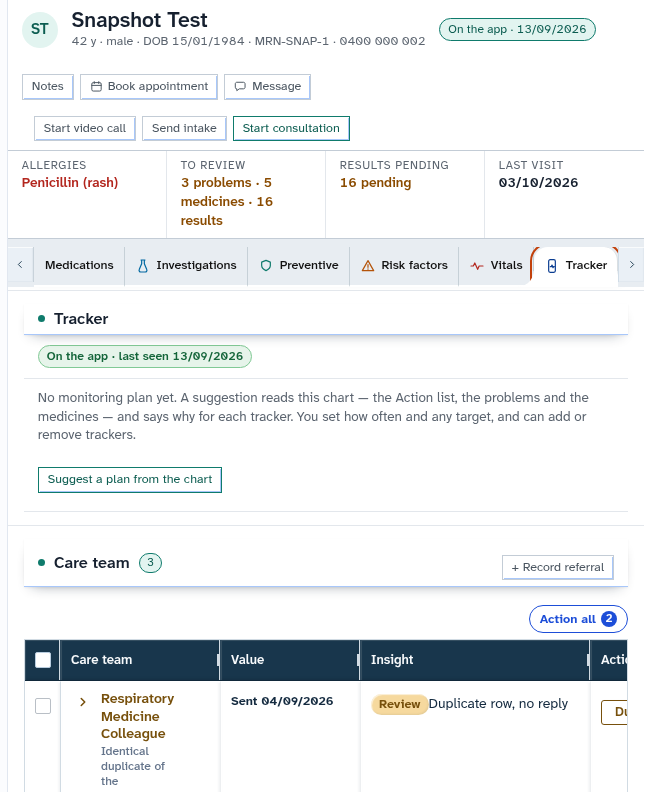
- In the chart sections menu, select Tracker to inspect the home monitoring dashboard and clinical target curves.
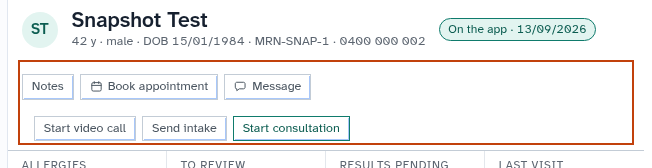
- In the header actions toolbar, select Send intake or generate a request link to collect patient-reported data.
Also on this screen
- Patient Tracker tab: Dedicated monitoring dashboard displaying home readings against target clinical bands.
- Record in file (Patient reported): Interactive card appearing in the patient chart allowing clinicians to accept patient-submitted data into official records.
- Patient request links: Generates encrypted single-use SMS links for secure questionnaire completion.
- Tracker agent background monitor: Background service that evaluates incoming readings and alerts clinicians when values exceed clinical safety limits.
- Tracker wake-up (Patient messages): Wakes Agent D when a patient submits a query via their mobile app, drafting a triage reply for clinician review.
- Tracker wake-up (Patient answers): Generates a notification when requested questionnaires or photos are received.
What Agent D can do
- Agent D reads active request statuses with
patients.request_read. - Agent D drafts new patient questionnaire requests (
patients.request_draft). - Agent D drafts questionnaire score saves with
patients.save_score. - Agent D cancels pending intake requests via
patients.request_cancel. - Agent D cannot dispatch SMS request links (
patients.request_send) without explicit human confirmation.
Safety (what needs your Confirm)
- Sending an intake request or questionnaire link dispatches an SMS message requiring human confirmation.
- Patient-reported data and questionnaire scores are only filed into the permanent medical record when you confirm the "Record in file" card.
Common questions
Do patients need to download an app to complete questionnaires?
No. Patient request links open securely in any standard mobile web browser without requiring an app installation.
What happens if a patient home blood pressure reading is dangerously high?
The background tracker agent detects readings outside safe clinical targets and immediately flags an urgent alert in the clinic "Waiting on you" notification tray.
Can I create custom questionnaire requests?
Clinics can configure standard validated clinical instruments (including PHQ-9, GAD-7, K10, and AUSDRISK) in clinic settings.
Related
Last reviewed: 03/10/2026.