Open a patient with Agent D
Agent D provides natural-language shortcuts and slash commands to search, pin, and open patient medical records rapidly.
What it does
Clinicians can use Agent D chat box from any screen to locate and open patient charts without touching the mouse: - /p (or /patient): Searches the practice register by name and date of birth, pinning the patient to the assistant active context. - /open: Immediately opens the complete electronic chart and medical record of the currently pinned patient in the primary workspace.
When a patient is pinned, Agent D displays a concise case summary card citing demographics, current medications, active conditions, and recent consultation milestones.
When to use it
Use Agent D commands when working hands-on-keyboard during phone consultations, when switching rapidly between sequential patients, or when asking clinical questions about a specific patient file.
Step by step
- Click into the Agent D chat input box and type
/pfollowed by the patient name (e.g./p Snapshot Test).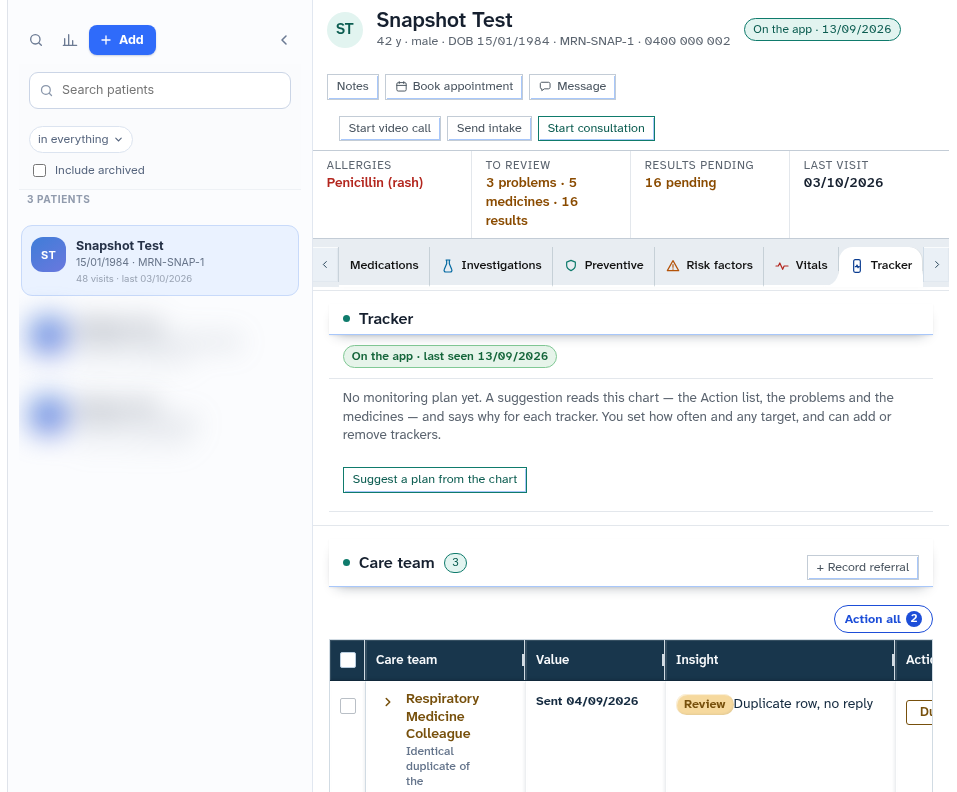
- Type
/openand press Enter to launch the pinned patient full electronic medical record.
Also on this screen
- Slash command (/p or /patient): Rapid keyboard command that resolves patient identity and binds the chart to the assistant session.
- Slash command (/open): Direct navigation shortcut that opens the full patient workspace.
What Agent D can do
- Agent D searches and pins patients to the conversation context using
/p. - Agent D opens the clinical chart in the main console using
/open. - Agent D brings together active problems, medications, and allergies when answering clinical inquiries about the pinned patient.
Safety (what needs your Confirm)
- Pinning and opening patient records are read-only navigation commands that do not alter medical records.
- Any clinical orders, prescriptions, or letters requested through Agent D chat require review and explicit confirmation on a Confirm card.
Common questions
What happens if multiple patients have the same name?
Agent D displays matching candidates with their date of birth (DD/MM/YYYY) and residential suburb so you can select the correct individual.
Can I ask Agent D questions about a patient without opening their full chart?
Yes. Once a patient is pinned with /p, you can ask questions (such as "What were their last blood test results?") and Agent D answers directly in chat.
Does typing /open close my active consultation?
If you have unsaved progress notes on another patient, Diagnify will prompt you to save or park the encounter before switching charts.
Related
Last reviewed: 03/10/2026.