Alert notes
Alert notes provide internal communication channels for practice staff regarding administrative warnings, billing alerts, and clinical safety reminders.
What it does
The Alert notes panel enables clinic staff to record internal notes linked to a patient file. Notes can be categorized by priority and kind (such as administrative reminders, billing requirements, clinical safety notices, or communication preferences). When a file containing an active alert note is opened, a prominent alert pop-up immediately alerts the user, requiring positive acknowledgement. Staff can reply to existing notes to build short communication threads, edit entries, or mark them as resolved.
When to use it
Use Alert notes to record front-desk billing instructions, alert colleagues to communication needs (such as requiring an interpreter), or document behaviour and safety alerts that must remain strictly internal.
Step by step
- On the patient record header, select the Notes button.
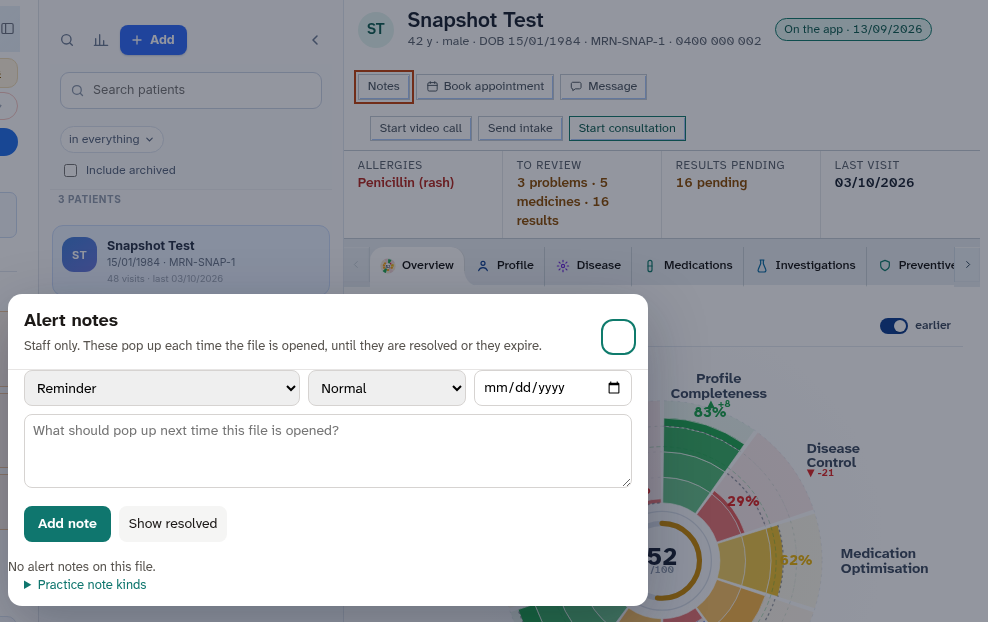
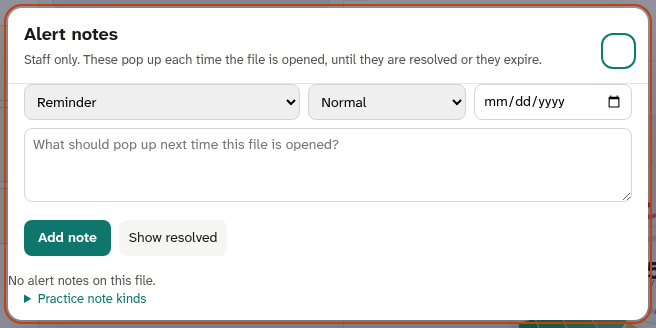
- Review active note threads, add replies, or select Resolve to archive a resolved issue.
Also on this screen
- Notes: Header button that reveals the slide-out alert notes panel.
- Notes count: Numerical badge showing how many unresolved alert notes exist on the file.
- Pop-up when the file opens: High-priority alert banner that displays automatically whenever the patient chart is accessed.
- Add, edit, reply, resolve: Action controls allowing staff to create new notes, update text, reply to threads, or resolve finished issues.
- Show resolved and custom kinds: Filter toggle allowing staff to review archived notes or define clinic-specific alert categories.
What Agent D can do
- Agent D reads staff alert notes using
patients.alert_notesand quotes relevant safety or billing reminders to the clinician. - Agent D drafts new staff alert notes with
patients.alert_note_add. - Agent D strictly enforces confidentiality: internal behaviour and safety notes are never repeated to patients, included in patient messages, or printed on referral letters.
Safety (what needs your Confirm)
- Alert notes are strictly internal staff communications.
- Adding, editing, or resolving an alert note requires explicit staff action and confirmation.
- Confidential safety notes are protected against disclosure in patient-facing documents.
Common questions
Will the patient see alert notes in their app?
No. Alert notes are strictly internal practice records and are never visible in the patient app or on printed visit summaries.
How do I clear an alert that is no longer relevant?
Open the Notes panel, locate the specific note thread, and select "Resolve". The note is archived and will no longer pop up when opening the file.
Can I review old resolved notes?
Yes. Open the Notes panel and tick "Show resolved" to inspect historical notes and resolution timestamps.
Related
Last reviewed: 03/10/2026.