Care team, care gap and files
The Care team, care gap and files screens manage multidisciplinary care coordination, health maintenance tracking, and external clinical document storage.
What it does
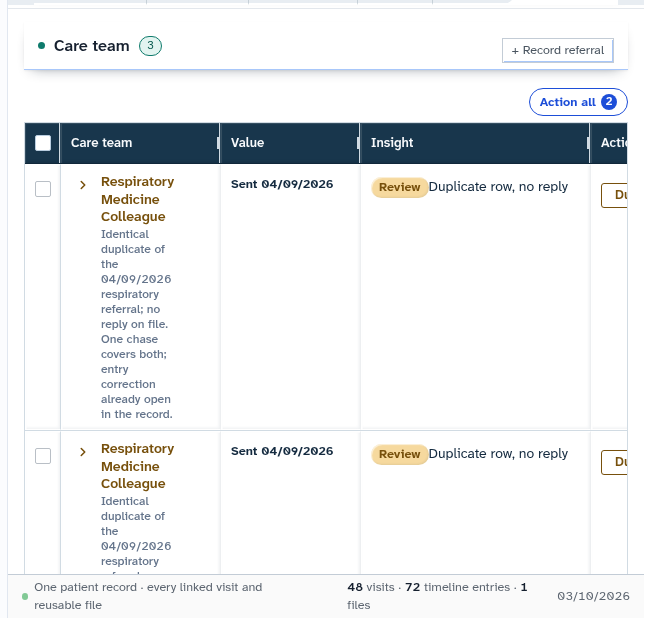
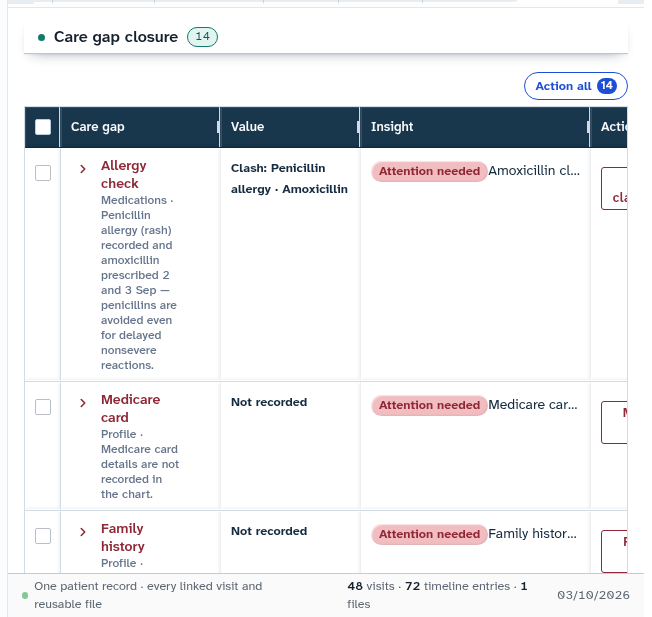
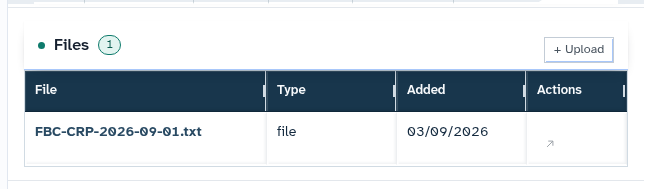
This panel integrates three critical care coordination tools: 1. Care team: Displays all clinicians and allied health professionals involved in the patient ongoing care, along with linked specialist referrals. 2. Care gap: Highlights outstanding clinical care gaps where routine health checks or chronic disease monitoring deviate from published clinical guidelines. 3. Files: Secure repository for uploaded external medical documents (such as discharge summaries, specialist letters, and diagnostic PDFs). Uploaded files are processed to extract searchable text rather than storing inaccessible binary blobs.
When to use it
Use this screen when adding a new specialist to the patient multidisciplinary care team, reviewing outstanding chronic disease care gaps, or uploading external medical correspondence received by fax or email.
Step by step
- Select Care team in the chart sections menu to view participating healthcare providers.
- Select Care gap to inspect open health maintenance gaps requiring clinical action.
- Select Files and choose Upload a file to import an external clinical document.
Also on this screen
- Care team: Lists external specialists, allied health providers, and general practitioners sharing clinical care.
- Care gap closure: Summary list of active preventive and monitoring care gaps awaiting resolution.
- Upload a file: Document uploader that extracts clinical text and indexes document metadata for searchability.
- Referrals heading: Section displaying active and historical outbound and inbound referral correspondence.
- Knowledge graph: Interactive visual graph illustrating connections between problems, medications, and care providers.
- Care plan section in the menu: Structured 12-month care planning overview organizing clinical jobs by visit timeline.
What Agent D can do
- Agent D reads patient documents and uploads using
patients.app_documentsandpatients.team_members. - Agent D attaches selected external documents to active consultations with
patients.attach_files_to_consult. - Agent D files documents uploaded via the patient app using
patients.file_app_document. - Agent D extracts text and indexes metadata when uploading files with
patients.upload_patient_file. - Agent D reads attending provider credentials with
patients.visit_provider.
Safety (what needs your Confirm)
- Uploading external documents permanently stores medical records on the patient chart.
- Resolving care gaps or updating care team members requires clinician review and confirmation.
Common questions
What document formats can be uploaded?
You can upload PDF files, scanned images (PNG, JPEG), and plain text documents. The system extracts readable text automatically.
How do I link an external specialist to a referral?
When drafting a referral letter, selecting the specialist adds them automatically to the patient Care team directory.
What is a "Care gap"?
A care gap represents an evidence-based clinical recommendation (such as an annual diabetic foot check or biennial mammogram) that has not been recorded within the recommended timeframe.
Related
Last reviewed: 03/10/2026.