Overview and the action list
The Overview screen presents the clinical insight wheel, domain scores, and the practice action list.
What it does
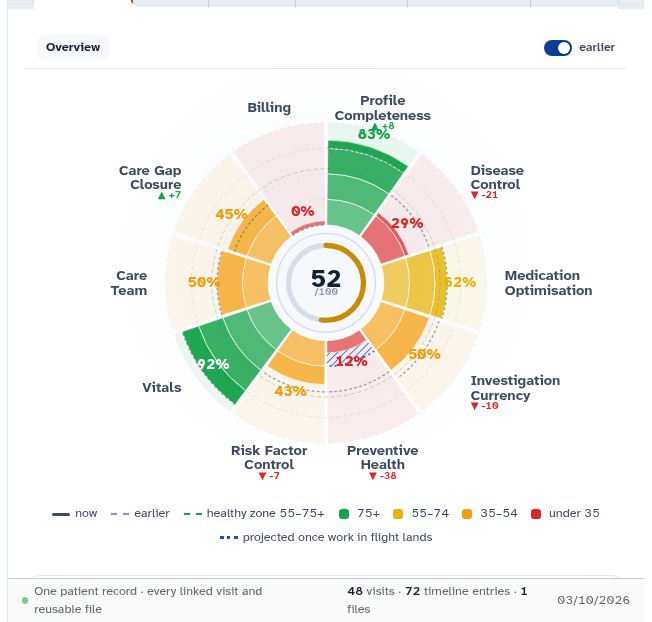
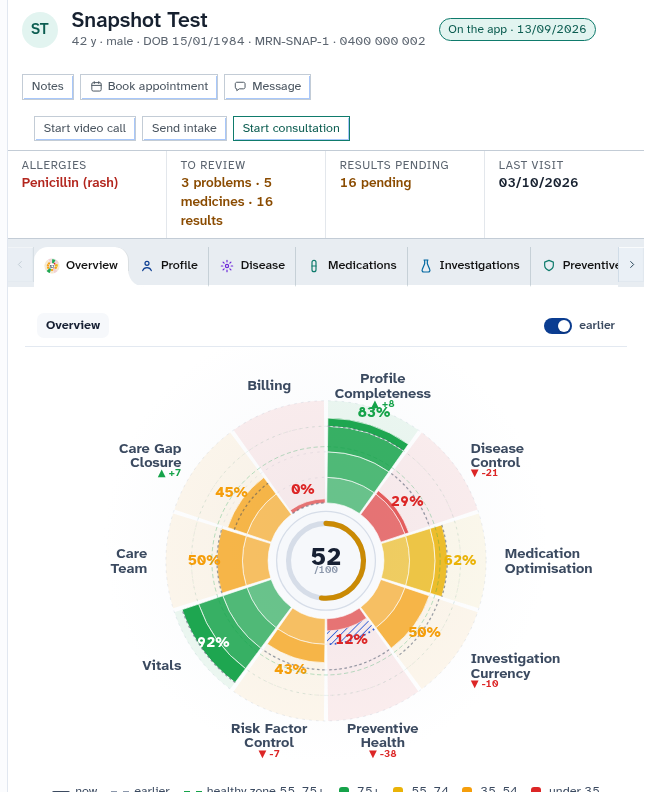
The Overview brings together the entire medical record into an clinical insight wheel. The wheel shows health maintenance and clinical risk across six domains (disease, medications, investigations, preventive, vitals, and care team). Selecting any slice opens detailed metrics for that domain. Beside the wheel, the Action list groups outstanding clinical tasks, care plan actions, and Agent D clinical recommendations grouped by type or by visit. Clinicians can accept suggestions, dismiss recommendations with reasons, or execute actions immediately using the "Do it" button.
When to use it
Review the Overview at the start of a consultation to understand the patient overall health status, identify overdue monitoring intervals, and review suggested clinical actions.
Step by step
- Select Overview in the chart menu to inspect the insight wheel and domain scores.
- Review the Action list beside the wheel to inspect suggested tasks and care plan actions.
Also on this screen
- Insight wheel: Interactive circular chart showing completeness and clinical risk across care domains.
- Earlier toggle: Switch that overlays previous scores against current metrics to track trajectory over time.
- Domain overview: Structured breakdown listing the clinical indicators contributing to each domain score.
- Action list tab: Tabbed list displaying outstanding clinical jobs and pending Agent D recommendations.
- By type and by visit: Grouping toggle sorting jobs either by clinical category or by scheduled encounter.
- Accept a suggestion: Promotes an Agent D recommendation onto the active clinic action list.
- Dismiss a suggestion: Removes a recommendation, allowing the doctor to record a clinical reason.
- Do it: Lightning bolt icon that launches the relevant clinical drawer (prescribing, pathology, or referrals) pre-filled for the job.
- Mark done, dismiss, reopen: Workflow actions to resolve, archive, or reopen action ledger items with full audit traceability.
- Chase windows: Configurable time intervals for automated and manual follow-up reminders.
- Book this visit: Drafts an appointment booking containing all jobs scheduled for that visit.
- Book the plan: Submits planned follow-up intervals into the practice recall calendar.
- Refresh the action list: Reloads the action ledger to reflect recent clinical entries.
- Show done and closed: Displays completed or dismissed jobs.
- Guidelines tab: Lists evidence-based guidelines matching the patient diagnosed conditions.
- Full re-read and read changes: Commands requesting Agent D to perform a complete chart audit or analyze only recent updates.
What Agent D can do
- Agent D reads domain insight scores and care plan summaries using
patients.insight. - Agent D searches clinical guidelines for active problems via
insight.guideline_search. - Agent D audits pending ledger jobs (
patients.ledger_jobs) and historical actions (patients.ledger_history). - Agent D drafts updates to ledger status (
patients.ledger_mark) and due dates (patients.ledger_set_due). - Agent D provides one-screen record summaries using
patients.snapshot.
Safety (what needs your Confirm)
- Accepting a suggestion or clicking "Do it" stages draft orders or booking cards.
- No medication is prescribed, no investigation is ordered, and no appointment is booked until you review and confirm.
Common questions
What causes a domain score to drop on the wheel?
Scores decrease when routine monitoring is overdue (such as an overdue HbA1c), when blood pressure exceeds targets, or when clinical care gaps remain unaddressed.
What happens when I click "Do it"?
The system opens the corresponding clinical tool (such as the pathology order drawer) pre-populated with the recommended test for your review.
Can I dismiss a recommendation that is not clinically appropriate?
Yes. Select "Dismiss" and optionally record a brief clinical rationale (such as "Patient declined" or "Addressed by specialist").
Related
Last reviewed: 03/10/2026.