Private fees
For staff
This page is for front-desk staff and people who manage clinic settings.
What it does
The Fees tab holds the private prices this practice charges when it is not bulk billing.
When to use it
Use it at setup, and whenever the practice changes its fees.
Step by step
-
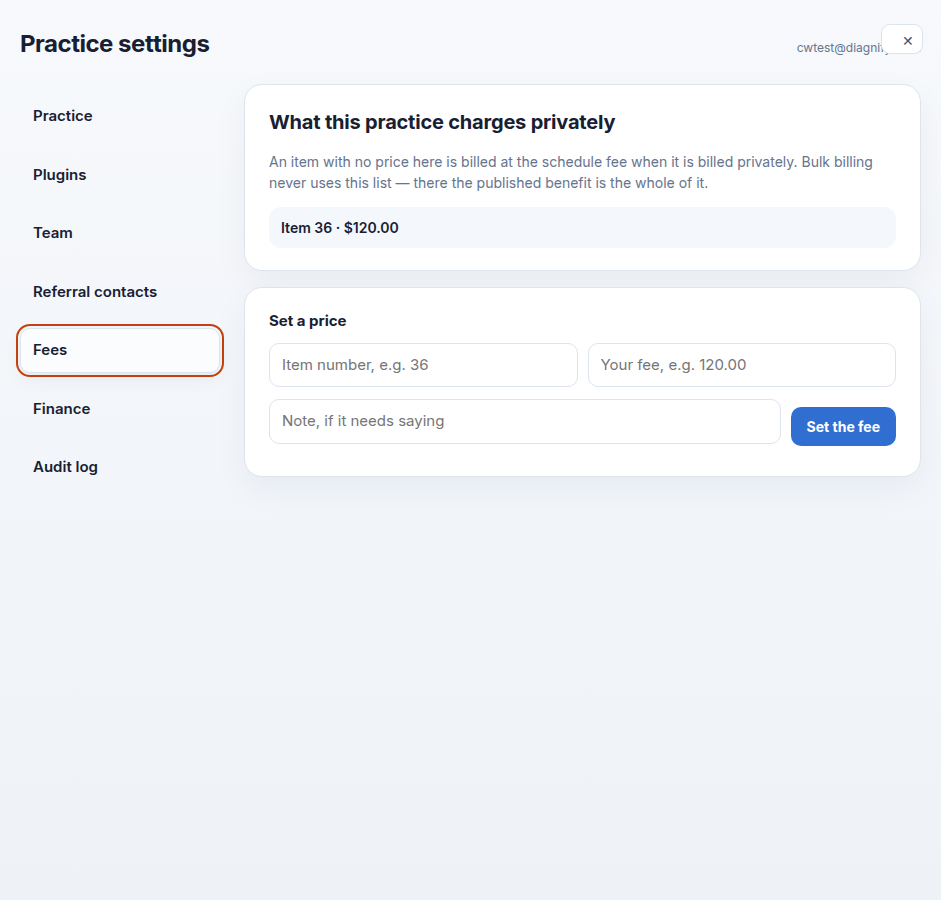
Press Fees. The private fee list is here.
-
Use Set a price to type an item number, a fee and an optional note. Save when it is right.
Also on this screen:
- After you type an item number, the screen shows the published description and schedule fee, or says the item is not in the schedule.
- An item with no price on your list uses the schedule fee at billing time.
- If billing is not set up yet, Fees says so and offers a button to the Plugins tab.
What Agent D can do
- Agent D cannot change your fee list. It can price a single invoice line while billing — see Ask Agent D to draft a bill.
Safety (what needs your Confirm)
- Set a price writes a fee that billing will use. Check the item number and the dollars before you save.
- The wrong fee on a common item bills wrong for every visit until it is fixed.
Common questions
What happens when an item has no price here? Billing falls back to the schedule fee for that item.
How do I know the schedule fee for an item? Type the item number. The screen shows the published description and schedule fee while you type.
Fees says billing is still being set up. Press the button to Plugins and install the billing parts first.
Related
Last checked: 03/10/2026.