Billing on the patient
What it does
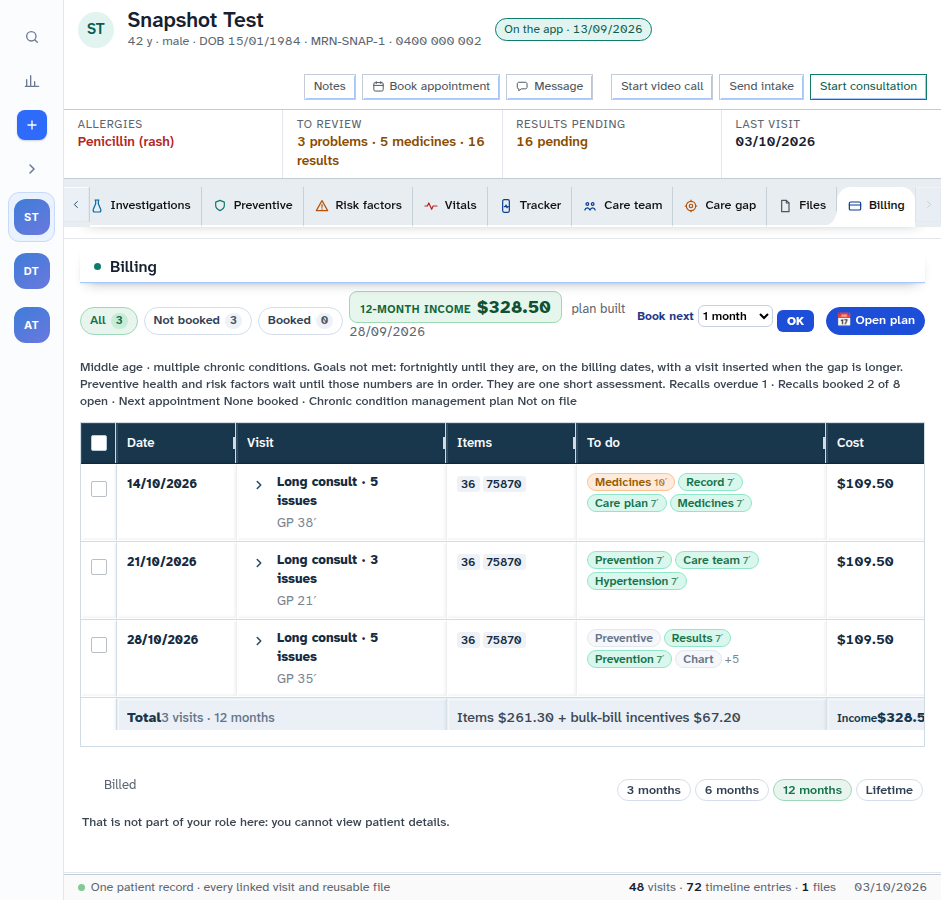
The Billing part of the chart shows the patient's 12-month billing plan: planned visits, income, and a statement of what was billed.
When to use it
Use it when the patient asks what they have been billed, or when you plan a year of visits.
Step by step
-
Open the patient — we use Snapshot Test — and press Billing.
-
Under Billed, the statement shows what was billed. In the shot above, this login is told it cannot view the account.
Also on this screen:
- The statement covers 3 months, 6 months, 12 months, or lifetime.
- The MBS review drawer lists Medicare items the patient may be eligible for, with the published fee, and can add one to the bill.
- The MBS rail is separate from the Billing part of the chart.
- The old record had a Billing tab with the same invoice editor. The chart now shows the billing plan instead.
What Agent D can do
- Draft item lines for this patient's bill with
/billon the test site. See Ask Agent D to draft a bill. New (test site) - Read the practice's billing workflow items.
Safety (what needs your Confirm)
- Adding an item from the review drawer puts it on the bill for you to check. Nothing is claimed until you raise, then issue.
- If your login cannot view the account, the screen tells you. Ask someone with billing access.
Common questions
What period does the statement cover? You choose: 3 months, 6 months, 12 months, or lifetime.
Why can't I see the Billed lines? Your login cannot view patient billing details. A login with billing access can.
What is the review drawer? A list of Medicare items the patient may be eligible for, with the published fee. You can add one to the bill from there.
Related
Last checked: 03/10/2026.